

Description
NetAlly LinkRunner 100G: high-speed fiber testing
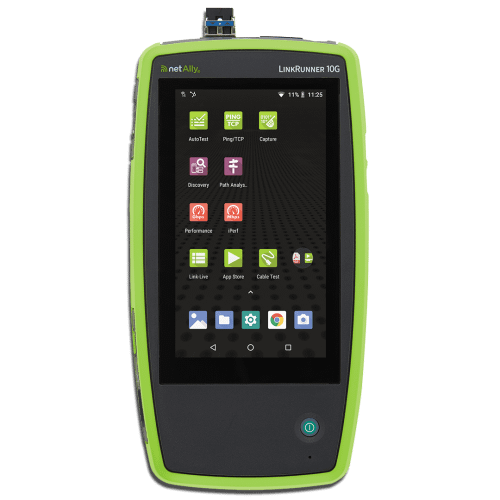
The NetAlly LinkRunner 100G is a handheld network tester for installing, validating and troubleshooting 25G, 40G, 50G and 100G Ethernet links. It brings optical-module information, link configuration and network diagnostics into a portable tool for enterprise and data center teams. Contact Norrati International in Dubai to discuss the correct kit, optics and support plan for your project.
A link light alone cannot explain every high-speed network problem. Optical compatibility, fiber connectivity and Forward Error Correction (FEC) settings all matter. This tester helps engineers investigate those conditions and document the results, whether the task is a new installation, a planned upgrade or an intermittent fault.
6 practical capabilities for your network team
- AutoTest: check the connected switch port, link speed, configuration and key network services through an automated test workflow.
- QSFP28 Insights: inspect transceiver type, operating speed, FEC settings and interface configuration for supported high-speed optics.
- Performance testing: assess end-to-end Layer 3 transmission performance using two LinkRunner 100G units.
- Path Analysis: investigate the switch and router path toward a destination to help locate problems beyond the directly connected link.
- EZ Wired: identify the nearest switch and review information such as port name, VLAN assignment and link configuration.
- Link-Live reporting: centralize test results so colleagues can review evidence and retain a record of the investigation.
Plan a NetAlly LinkRunner 100G deployment
Start with the link you need to validate. Record the switch models, intended speed, optical module part numbers, fiber type and connector arrangement at both ends. These details give the selection discussion a practical foundation and help distinguish a tester requirement from an optics or cabling requirement.
For an acceptance test, agree on the endpoints, test window and evidence your team needs before arriving on site. If the requirement includes the Performance Test, plan access to both ends and arrange two equivalent units. For troubleshooting, bring the affected port details, recent configuration changes and a description of when the symptoms occur.
Use the NetAlly LinkRunner 100G as part of a documented workflow: establish the intended configuration, capture the observed condition, make the relevant correction and repeat the test. Saving the before-and-after results gives the next engineer context and helps your project team explain the outcome.
Explore our network testing and performance assurance solutions or compare the wider NetAlly product catalogue when selecting tools for different network layers.
NetAlly LinkRunner 100G specifications
| Product SKU | LR100G-100-Z |
|---|---|
| Test interface | QSFP28 |
| Management and USB | RJ-45 management, USB Type-A and USB Type-C On-the-Go |
| Display | 5-inch capacitive touchscreen, 720 × 1280 pixels |
| Weight | 0.90 kg |
| Dimensions | 10.4 × 19.6 × 7.1 cm |
| Typical battery operation | 1.5–3 hours, depending on the features used |
| Listed media support | 100GBASE-LR4, 100GBASE-SR4 and 100GBASE-CR4; QSFP28-compliant modules |
Kit contents and required support
The LR100G-100-Z kit includes the tester, power supply with regional plugs, a dual-rate 100G/40G SR4 QSFP28 multimode optical interface, a 2-meter multimode fiber patch cable, an MPO cleaner and a sling bag.
AllyCare Pro is required. New units need an active one-year or three-year plan. NetAlly requires registration and activation within three days of first power-on. Confirm the support term and the suitability of the supplied optics when requesting a quotation. Pricing, local availability and delivery should be confirmed with Norrati for the required configuration.
Frequently asked questions
Does one NetAlly LinkRunner 100G perform every test by itself?
No. The manufacturer specifies two equivalent testers for the network Performance Test. Plan this requirement separately from the local link and configuration checks you intend to perform.
Why examine FEC on a high-speed fiber link?
Error correction can conceal a deteriorating link while traffic continues to pass. Checking the FEC configuration and counters adds useful evidence when a connection appears healthy but users experience intermittent problems.
What information should I send with a quotation request?
Include the target speed, switch and transceiver models, single-mode or multimode fiber, connector types, number of test locations and desired support term. Mention whether you need two units for end-to-end performance testing.
Official resources and product advice
Review the official NetAlly LinkRunner 100G product page and manufacturer datasheet for current technical information. For help selecting your configuration, contact Norrati International.




Reviews
There are no reviews yet.