

Description
AXIS P13 box camera family
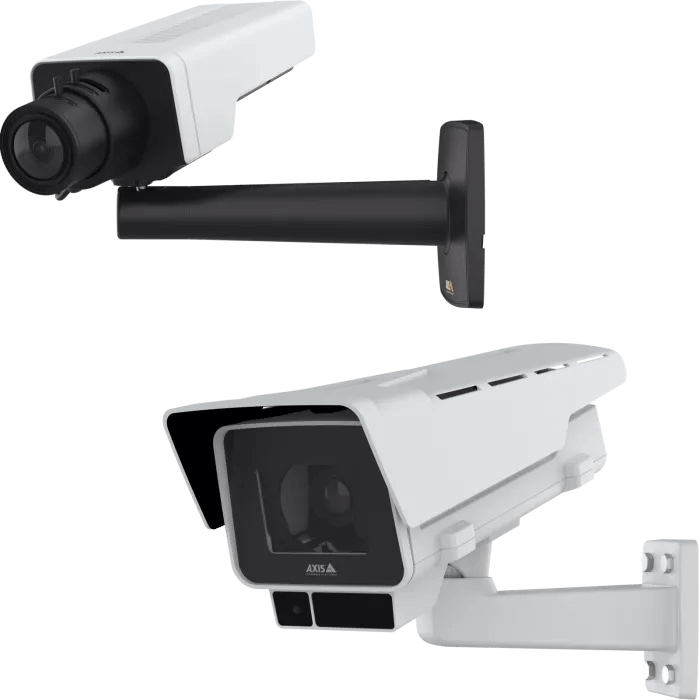
AXIS P13 includes network cameras with multiple resolutions and lens configurations. Current ranges include 2 MP, 5 MP and 8 MP options. Indoor, outdoor and barebone variants serve different installation requirements, so the complete ordering code is important when comparing specifications and included components.
On this page
Match the lens to the scene
Exchangeable lenses and supported i-CS or P-Iris options provide configuration choices within the family. Define the target area, distance and required detail before choosing the lens. Include the proposed mounting height and any restrictions on camera position so the view can be assessed against the actual site.
Understand barebone configurations
Some AXIS P13 variants identified with -B or -BE are supplied without a lens or mount. They require a complete configuration review rather than an assumption that the camera arrives ready for the intended installation. Check the current documentation and quotation for compatible lens, mounting and environmental components.
Review imaging and analytics
The range includes models with advanced imaging, AI-based analytics and Axis Edge Vault features. Confirm the functions and applications available on the exact camera. Describe changing light levels, bright backgrounds and the operational event the team needs to observe. This keeps feature comparisons connected to a useful viewing requirement.
Plan the installation and recording
Record the network connection, available power and video management platform. For outdoor locations, check the selected model’s environmental specification and compatible accessories. Include the retention period and expected image settings in bandwidth and storage planning, and document any changes made during commissioning.
Prepare an AXIS P13 enquiry
Send Norrati the scene plan, quantities, intended model and lens requirements. Identify whether a standard or barebone configuration is being considered and list existing recording equipment. We can discuss the complete equipment schedule and availability. Confirm exact ordering codes, included items and the acceptance view before purchase so installation and procurement teams work from the same assumptions.
Review the official manufacturer information for model specifications.
Contact Norrati International in Dubai for configuration advice or browse the product catalogue.



Reviews
There are no reviews yet.