
Description
Profitap vTAP visibility for VMware networks
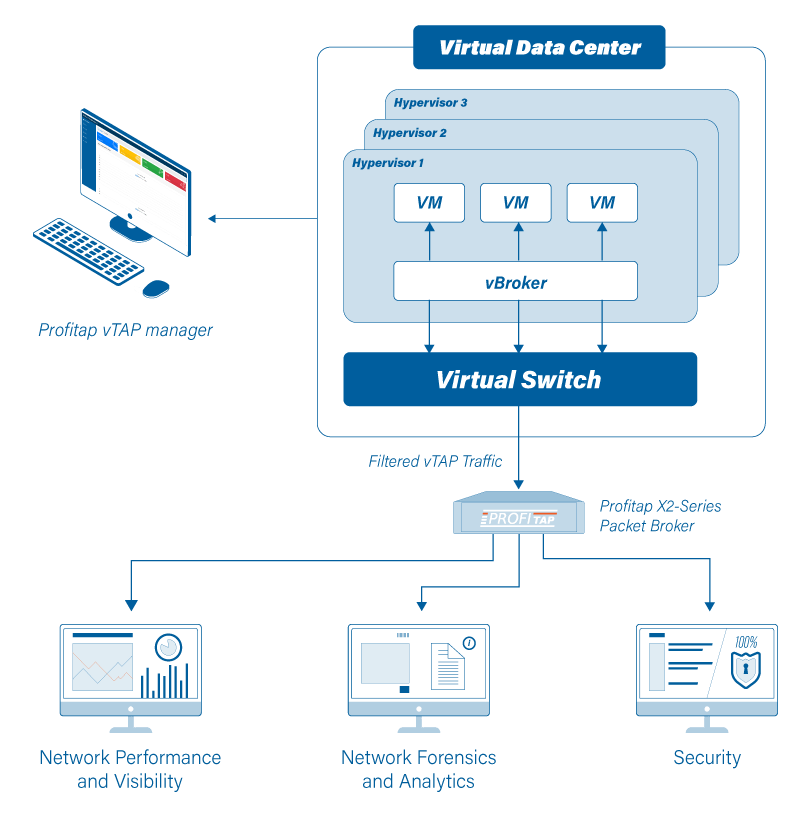
Profitap vTAP provides packet visibility inside VMware environments, including traffic between virtual machines. It mirrors and filters traffic at the hypervisor level and forwards selected copies to physical or virtual monitoring tools.
The embedded vBroker aggregates virtual traffic, applies filters and creates tunnels toward monitoring destinations. This helps connect activity within the virtual infrastructure to the performance and security tools used by the operations team.
On this page
Plan the virtual traffic paths
Start by identifying the virtual networks and workloads involved in the investigation. Document which conversations remain inside the host or virtual environment and which cross physical links. This helps determine the observation points needed for the monitoring scope.
- Record the VMware environment and supported platform versions.
- Identify the virtual machines, networks and traffic of interest.
- Choose physical or virtual analysis destinations.
- Plan filtering, tunnel paths and destination capacity.
- Define ownership, access and change procedures.
Use Profitap vTAP with your monitoring tools
Decide which traffic each tool actually needs before configuring forwarding rules. Consider the bandwidth available to carry mirrored traffic and the capacity of the receiving tool. A monitoring design should explain both how packets are selected and where they are analyzed.
Prepare the configuration discussion
Share a virtual network diagram and the current monitoring topology with Norrati. Include the deployment version, expected traffic rates and the issue you want to investigate. Confirm licensing, compatibility and the proposed integration before ordering so the configuration matches the environment.
Manufacturer reference
Identify which virtual traffic is in scope for Profitap vTAP
Record the virtualization platform, workloads and monitoring tools involved. Specify which traffic should be visible, how it reaches the collector and what access rules apply to the captured data. Check the supported configuration and licensing before deployment.
Related product: Profitap 10GBASE-T Network TAP.
Review the manufacturer information for the exact model and configuration.
Discuss Profitap vTAP with Norrati
Contact Norrati International in Dubai with your requirements, quantity and deployment location. We can discuss the configuration and the details needed for a quotation.


Reviews
There are no reviews yet.